To move Mozilla mission, Mitchell Baker, Chairperson of Mozilla has proposed a few goals for the next few years called "Mozilla 2010 Goals". As part of my contribution to it, I have answered a few questions from a personal perspective. My answers are in a broader sense. Specific conclusions can be made after discussions in the line of my answers. Their purpose is guiding.
1. How do you feel the Mozilla community can help you with your individual development, whether it's personal, professional, or both?
Today, nearly all of us have a virtual life synced with our real life. The internet (not to be confused with the web) is an essential tool/way of communication, job control, etc. Mozilla tools like Firefox and Thunderbird (these are the ones I use) serve as basic internet usage tools. I follow internet news, check email and follows RSS feeds through Thunderbird and browse through Firefox. These two tools are used seamlessly by me. The basic nature of these two tools in my case is evident from the fact that Firefox was the first software I downloaded after more than a dozen reinstalls I have had during my four years of experience with it.
2. Do you feel Mozilla can be more involved in certain communities, whether they be geographical, technological, or within the Mozilla world?
Yes I do feel Mozilla can be more involved in many other communities. For example, currently Firefox on Linux has some GNOME bindings. KDE users (XFCE users won't have much trouble as they have some GNOME linkages.) find this problematic. I heard of Nokia developing a QT port of Firefox.
3. Where do you think innovation comes from in the Mozilla world?
Every time we use a software product, we translate our needs into tasks that the product can do. There are occassions where this is not possible and we either find a work around or leave the task. However, sometimes when direct translation of needs into tasks is not possible, we boldly go for creating the functionality to suit our needs. This is where innovation comes in. For example, plugins serve specific purposes which their authors want to have as functionalities.
4. What specific areas in the world of Internet technology and the open Web do you see Mozilla being a leader?
I see Mozilla as a leader in basic communication. I like the ease of usage of Mozilla products.
5. How can Mozilla play a bigger role in moving the Web forward?
Today many people do not feel a difference between online use and offline use. That transition phase should be minimised more and a seamless integration of browsing, mailing, document reading, writing and editing should be aimed at. The ease of usage, security and simplicity of the technology shall lead it ahead.
6. Do you feel strongly about how your information is stored and used online by the websites you visit?
Yes. I like privacy and try to minimize the information that is being stored.
7. What concerns do you have about Mozilla getting more involved with data related to Web users?
I doubt breach of privacy.
8. What benefits do you see for aggregating anonymous "usage data" and making it available to the world as a public resource?
No problems as long as the user permits it explicitly and with full knowledge of it rather than in ignorance.
9. Do you have ideas on how Firefox for mobile devices can carry on the Mozilla mission?
I want seamless integration of web services and Firefox for mobile is an essential part of it.
10. Why do you think Firefox has not captured more browser marketshare?
Ignorance about Mozilla products is a major cause. I would like to have input from people in the corporate sector on this issue.
11. What can Mozilla do in order to spread awareness about the open Web and continue our Firefox marketshare momentum?
Mozilla can make its products more versatile.
Thursday, 20 November 2008

Linux distro chooser
Linux comes in various flavours called distros. Distrowatch has been keeping track of various distros. However, finding a suitable distro is usually difficult, especially for newbies. They find it difficult to link the description of distros and their criteria of choosing a distro. Distros usually describe their package management systems, desktop environments, or their particular purpose. However, users want descriptions explaining ease of usage. [Basically, the learning curve for linux is steep.] However, here is a site that tries to link user criteria with description of distros. The results are not very satisfying, yet it is worth trying. Moreover as it is available in a number of languages, non-english speakers can benefit from it.
Friday, 31 October 2008
Enlightenment
I am back with Enlightenment. Though I have philosophical orientations, this is not philosophical (i.e. not in a direct way; you may find indirect hints and undertones though).
Let me start with installing Enlightenment desktop shell in openSUSE. Installing details on other platforms are available at their website. I used YaST to simplify the process (at least thats what I thought in the beginning). I began by adding Dmitry Serpokryl's repositories. You can find specific repositories for your version of openSUSE here. He also offers openSUSE live CD with Enlightenment desktop shell here.
As most YaST users might expect, installation should have been a simple 2 step process:
1. check the required packages; and
2. accept the changes and solve any dependency problems.
It was pretty much the same. I shall describe how I got over the dependency problems on my system (openSUSE 10.3 x86_64) and hope it helps you as well. I suggest you add Dmitry's metapackage repository along with his other Enlightenment repositories. He also provides a one click install option but it didn't work for me. So I decided to try to install individual packages myself and see if it works.
I found install details on the Enlightenment site for Ubuntu which suggested the following sequence of installation of packages:
1. Eina
2. Eet
3. Evas
4. Ecore
5. Efreet
6. Embryo
7. Edje
8. E_DBus
However, when I searched for Eina I did not find it. Here I decided to be bold and trust YaST. I skipped Eina and installed the rest. I am happy it worked for me and I have Enlightenement now. you can actually go for installation from source as well. I was just trying YaST. Let's see the initial looks of Enlightenment.
 This is the default Bling theme. When you start the Enlightenment desktop shell the first thing that you notice different is the behaviour of mouse clicks. I shall not describe that as I want it to be an interesting experience of yours as it was for me.
Below you can see windows of different shapes placed as per my use and ease. Enlightenment remembers the size of windows. You can suit your needs with various sizes: the goal being productivity. I have read many criticisms about Enlightenment being all about eye candy. However, I think the concept of desktop shell introduced by Enlightenment can be used to provide ease of use. Another interesting feature was the drag bar. At the beginning its purpose might appear to be just eye candy or fancy desktop item. However, I have found out that it can a great tool in simplifying usage and boosting productivity. If you know any use of dragging windows from one desktop to another, then this drag bar will be of much help to you.
After getting the initial feel of Enlightenment desktop shell, I switched to the famous 23Oz theme. Its cool. Have a look. Below is a shelf with the drag bar. You can add more shelves and widgets to suit your needs.
 I shall speak about two other interesting featuresof Enlightenment aimed at improved productivity. One is moving to a neighbouring desktop when the mouse pointer tries to cross the edge of the screen. The other is the desktop menu behaviour. In KDE, GNOME and other traditional window managers, when there isn't ample space for a submenu on the right, the submenu opens up to the left. However, in Enlightenment the menu shifts left to make space for the submenu. You can see that below.
 To conclude let me tell about the concept of desktop shel. DR17 is not just an application framework like KDE or GNOME. It integrates GUI elements to manage both files and windows. I suggest you go for first-hand experience by trying Enlightenment.
Let me start with installing Enlightenment desktop shell in openSUSE. Installing details on other platforms are available at their website. I used YaST to simplify the process (at least thats what I thought in the beginning). I began by adding Dmitry Serpokryl's repositories. You can find specific repositories for your version of openSUSE here. He also offers openSUSE live CD with Enlightenment desktop shell here.
As most YaST users might expect, installation should have been a simple 2 step process:
1. check the required packages; and
2. accept the changes and solve any dependency problems.
It was pretty much the same. I shall describe how I got over the dependency problems on my system (openSUSE 10.3 x86_64) and hope it helps you as well. I suggest you add Dmitry's metapackage repository along with his other Enlightenment repositories. He also provides a one click install option but it didn't work for me. So I decided to try to install individual packages myself and see if it works.
I found install details on the Enlightenment site for Ubuntu which suggested the following sequence of installation of packages:
1. Eina
2. Eet
3. Evas
4. Ecore
5. Efreet
6. Embryo
7. Edje
8. E_DBus
However, when I searched for Eina I did not find it. Here I decided to be bold and trust YaST. I skipped Eina and installed the rest. I am happy it worked for me and I have Enlightenement now. you can actually go for installation from source as well. I was just trying YaST. Let's see the initial looks of Enlightenment.
 This is the default Bling theme. When you start the Enlightenment desktop shell the first thing that you notice different is the behaviour of mouse clicks. I shall not describe that as I want it to be an interesting experience of yours as it was for me.
Below you can see windows of different shapes placed as per my use and ease. Enlightenment remembers the size of windows. You can suit your needs with various sizes: the goal being productivity.
 I have read many criticisms about Enlightenment being all about eye candy. However, I think the concept of desktop shell introduced by Enlightenment can be used to provide ease of use. Another interesting feature was the drag bar. At the beginning its purpose might appear to be just eye candy or fancy desktop item. However, I have found out that it can a great tool in simplifying usage and boosting productivity. If you know any use of dragging windows from one desktop to another, then this drag bar will be of much help to you.
After getting the initial feel of Enlightenment desktop shell, I switched to the famous 23Oz theme. Its cool. Have a look.
 Below is a shelf with the drag bar. You can add more shelves and widgets to suit your needs.
 I shall speak about two other interesting featuresof Enlightenment aimed at improved productivity. One is moving to a neighbouring desktop when the mouse pointer tries to cross the edge of the screen. The other is the desktop menu behaviour. In KDE, GNOME and other traditional window managers, when there isn't ample space for a submenu on the right, the submenu opens up to the left. However, in Enlightenment the menu shifts left to make space for the submenu. You can see that below.
 To conclude let me tell about the concept of desktop shel. DR17 is not just an application framework like KDE or GNOME. It integrates GUI elements to manage both files and windows. I suggest you go for first-hand experience by trying Enlightenment.
Tuesday, 21 October 2008
Xfce
Recently, I was on a spree of trying desktop environments. My primary desktop has been KDE so far. I had used GNOME from Ubuntu live cds and on my roomie's laptop. So the two giants are out of the question and I went for other desktop environments.
I had heard that Xfce had recently shown improvements. I tried it for the following two basic reasons:
(i) speed
(ii) less resource consuming.
To quote Olivier Fourdan, the creatorof Xfce, it is a free software desktop environment based on the GIMP Toolkit (GTK+ 2.x) and aims to be fast and lightweight, while still being visually appealing and easy to use. "Designed for productivity, it loads and executes applications fast, while conserving system resources." (Olivier Fourdan, creator)Xfce is a free software desktop environment based on the GIMP Toolkit (GTK+ 2.x) and aims to be fast and lightweight, while still being visually appealing and easy to use. "Designed for productivity, it loads and executes applications fast, while conserving system resources."
Getting Xfce was easy with YaST. I just had to check the Xfce pattern and accept the selections. The rest was taken care of by YaST and SUSE. openSUSE can be considered really productive in this regard.

Xfce is said to be a CDE clone and therefore is obviously lightweight and performance oriented. I liked the availability of a button for shade mode for all windows as you can see above. There is also a Mac style dock at the bottom. By default it provided me double click environment unlike KDE's single click one. It supports XMMS as its media player. However I got Amarok playing on it as I am kind of obsessed with Amarok now. You can find the Amarok in the systray in the top right corver above.

Thunar the default file manager for Xfce, is seen above. It resembles Nautilus and is designed for speed and a low memory footprint. It is highly customizable through plugins.
My next post will be about the next trial - Enlightenment.
I had heard that Xfce had recently shown improvements. I tried it for the following two basic reasons:
(i) speed
(ii) less resource consuming.
To quote Olivier Fourdan, the creatorof Xfce, it is a free software desktop environment based on the GIMP Toolkit (GTK+ 2.x) and aims to be fast and lightweight, while still being visually appealing and easy to use. "Designed for productivity, it loads and executes applications fast, while conserving system resources." (Olivier Fourdan, creator)Xfce is a free software desktop environment based on the GIMP Toolkit (GTK+ 2.x) and aims to be fast and lightweight, while still being visually appealing and easy to use. "Designed for productivity, it loads and executes applications fast, while conserving system resources."
Getting Xfce was easy with YaST. I just had to check the Xfce pattern and accept the selections. The rest was taken care of by YaST and SUSE. openSUSE can be considered really productive in this regard.

Xfce is said to be a CDE clone and therefore is obviously lightweight and performance oriented. I liked the availability of a button for shade mode for all windows as you can see above. There is also a Mac style dock at the bottom. By default it provided me double click environment unlike KDE's single click one. It supports XMMS as its media player. However I got Amarok playing on it as I am kind of obsessed with Amarok now. You can find the Amarok in the systray in the top right corver above.

Thunar the default file manager for Xfce, is seen above. It resembles Nautilus and is designed for speed and a low memory footprint. It is highly customizable through plugins.
My next post will be about the next trial - Enlightenment.
Friday, 17 October 2008
Compacting folders in Mozilla Thunderbird
For those who use e-mail clients but do not understand "compacting folders", let me tell you that it is essential. The reason you might never have heard of compacting is that most e-mail clients default to automatically compacting the folder whenever a certain amount of space is wasted, while we have to enable this in Thunderbird. Tom Koch speaks about it with Outlook Express background referring to it as The Other E-Mail Threat: File Corruption in Outlook Express.
When we delete or move a message, most e-mail clients simply flag the message and postpone the actual task of deletion. So a large number of flagged messages accumulate over time until the folders are compacted. Even emptying the Trash does not physically delete them. this is done by e-mail clients to improve performance by not requiring to rewrite the entire folder every time we delete a single message. In Thunderbird, the reason is even stronger as the inbox is not a folder but a single huge file. So are trash and other folders. this makes manual compaction in Thunderbird a bit complicated and unwieldy for many users.
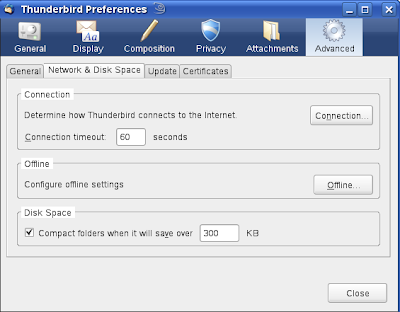
To do it in Thunderbird, follow these simple steps:
click on Tools -> Options -> Advanced -> Network & Disk Space -> Disk Space. Then check the box for "Compact folder when it will save over 100 kB" and click OK. If you have a high message rate like me, then you may change the default 100 kb limit to 300 kb.
When we delete or move a message, most e-mail clients simply flag the message and postpone the actual task of deletion. So a large number of flagged messages accumulate over time until the folders are compacted. Even emptying the Trash does not physically delete them. this is done by e-mail clients to improve performance by not requiring to rewrite the entire folder every time we delete a single message. In Thunderbird, the reason is even stronger as the inbox is not a folder but a single huge file. So are trash and other folders. this makes manual compaction in Thunderbird a bit complicated and unwieldy for many users.
To do it in Thunderbird, follow these simple steps:
click on Tools -> Options -> Advanced -> Network & Disk Space -> Disk Space. Then check the box for "Compact folder when it will save over 100 kB" and click OK. If you have a high message rate like me, then you may change the default 100 kb limit to 300 kb.

Sunday, 12 October 2008
Firefox
In this blog, I am writing about some Firefox tweaks and add-ons that help me improve my online experience. AdBlockPlus heads the list. It is an add-on by Wladimir Palant that blocks unwanted ads. As I hate to see fancy useless flash ads on my screen, this is always the first add-on I get from Mozilla. Also, it has remained at the top of recommended add-ons for quite some time. The ABP icon usually resides right of the search bar as you can see below.

Next comes Video DownloadHelper.
At times videos are more insightful than plain text. That's why sites like youtube are so popular. I like to keep videos for offline use. So Video DownloadHelper is an essential for me. Its icon resides to the left of address bar as seen below.

It is usually deactivated; but activates when there are links that can be downloaded. There are lots of add-ons available that allow numerous customizations from splash screens to 3D cube effect.
Now let's see how easy it is to manage cookies in Firefox. Simply click on Tools->Options->Privacy. A window appears as follows.

You can manage your private data, cookies and history to suit yourself.

Next comes Video DownloadHelper.
At times videos are more insightful than plain text. That's why sites like youtube are so popular. I like to keep videos for offline use. So Video DownloadHelper is an essential for me. Its icon resides to the left of address bar as seen below.

It is usually deactivated; but activates when there are links that can be downloaded. There are lots of add-ons available that allow numerous customizations from splash screens to 3D cube effect.
Now let's see how easy it is to manage cookies in Firefox. Simply click on Tools->Options->Privacy. A window appears as follows.

You can manage your private data, cookies and history to suit yourself.
Sunday, 5 October 2008
Friday, 26 September 2008
Google changed the definition of beta
Google changed the definition of beta just like it has done for many other things. From the beginning it has become a centre of innovation in software. Google has shown the way to capture the market when open source software was gaining momentum. Google uses a nice business strategy with a place for open source in it. It is interesting to note that Google supports Firefox, yet launches its own Chrome browser.
I have been critical of the the incorrect use of 'beta' for about two years now, but mostly offline. However, recently I found a discussion at Slashdot supporting my ideas. That inspired me to write this blog. I like the line about getting out of jail for free.
'Beta' means it may change without warning. Well then a number of Google applications tell us at the first page that they are likely to change without warning and we are supposed to tread ahead at our own risk. However, they do it with flair: the 'beta' tags usually blend nicely with the background. Thereby, most of the users become mere beta testers for Google - a novel way to get intelligent testers at a large scale, as required for web applications.
I have been critical of the the incorrect use of 'beta' for about two years now, but mostly offline. However, recently I found a discussion at Slashdot supporting my ideas. That inspired me to write this blog. I like the line about getting out of jail for free.
'Beta' means it may change without warning. Well then a number of Google applications tell us at the first page that they are likely to change without warning and we are supposed to tread ahead at our own risk. However, they do it with flair: the 'beta' tags usually blend nicely with the background. Thereby, most of the users become mere beta testers for Google - a novel way to get intelligent testers at a large scale, as required for web applications.
Saturday, 26 July 2008
Democracy and communism
This is my first non-technical blog. So, there might still be a technical undertone (probably my meticulous nature forces it more often than I realise).
This one is about democracy. Well first a little recap as democracy is fairly new. In the old autocratic times, there used to be kings on whose wisdom the kingdom either prospered or got doomed. With the world shrinking small, some people figured out better ways of controlling the large populations of big countries like India, America, etc. Those were democracy and communism. (Frankly speaking, there might be others but these two have been evidently the most influential. There might be other forms which the academicians might like to point out. Also, India came much later in the race of democracies. I just put it there because I am an Indian and also in keeping with India's huge population.)
We all know that there are rules and that they are broken. The difference is in the way it is done in a democracy and in a communist country. The methods of covering up are different, but that doesn't mean there is no covering up. The communist guys talk about economy clearly. The democratic fellows find better words. Well the American presidents have had a history of politeness in public speaking and George Bush Jr. made it to the news by being the first to break the unwritten law.
"People vote their wallets, even when they know the politicians are lying through the teeth." - Mark Ludwig
At first I thought I wouldn't have to explain this but the fact that I am writing this blog tells me that some people need an explanation because otherwise I wouldn't need to write this blog. People vote their wallets; all the while using words that tell them they are doing some common good or some other crap. By this they are lying to themselves, fooling themselves into an illusionary world that doesn't exist.
"Democracy is two wolves and a lamb voting on what to have for lunch. Liberty is a well-armed lamb contesting the vote!" - Benjamin Franklin
This one is about democracy. Well first a little recap as democracy is fairly new. In the old autocratic times, there used to be kings on whose wisdom the kingdom either prospered or got doomed. With the world shrinking small, some people figured out better ways of controlling the large populations of big countries like India, America, etc. Those were democracy and communism. (Frankly speaking, there might be others but these two have been evidently the most influential. There might be other forms which the academicians might like to point out. Also, India came much later in the race of democracies. I just put it there because I am an Indian and also in keeping with India's huge population.)
We all know that there are rules and that they are broken. The difference is in the way it is done in a democracy and in a communist country. The methods of covering up are different, but that doesn't mean there is no covering up. The communist guys talk about economy clearly. The democratic fellows find better words. Well the American presidents have had a history of politeness in public speaking and George Bush Jr. made it to the news by being the first to break the unwritten law.
"People vote their wallets, even when they know the politicians are lying through the teeth." - Mark Ludwig
At first I thought I wouldn't have to explain this but the fact that I am writing this blog tells me that some people need an explanation because otherwise I wouldn't need to write this blog. People vote their wallets; all the while using words that tell them they are doing some common good or some other crap. By this they are lying to themselves, fooling themselves into an illusionary world that doesn't exist.
"Democracy is two wolves and a lamb voting on what to have for lunch. Liberty is a well-armed lamb contesting the vote!" - Benjamin Franklin
Subscribe to:
Posts (Atom)